

Instagram Hashtags in 2026: What Actually Matters Now

Instagram hashtags used to be a whole production.
Find 30 of them. Separate them into different lists. Hide them in the first comment. Rotate the lists so Instagram would not think you were doing something shady. Then cross your fingers and hope the algorithm rewarded all that nonsense.
That routine needed to retire.
Instagram now allows up to five hashtags on a post or Reel. More importantly, hashtags are no longer the reach button people once treated them as. They can help Instagram understand and organize your content, and they may help with search, but they will not rescue a weak post or fling it in front of thousands of new people.
That does not make Instagram hashtags useless. It means we can stop turning them into a part-time job.
If you are a Virtual Assistant creating content for yourself or your clients, this guide will help you choose better hashtags, use them in a way that makes sense, and get back to the work that has a much bigger effect on your results.
Are Instagram Hashtags Still Relevant?
Yes, but their job has changed.
Hashtags act more like labels than megaphones. They give Instagram another clue about the topic of your post and can help people find related content through search. According to Instagram’s current Help Center guidance, you can use up to five hashtags on a post.
That five-hashtag limit tells us exactly where Instagram is headed. The platform wants a few specific, relevant tags, not a giant paragraph of whatever looked popular that morning.
Hashtags can support your content, but they do not create demand for it. Your topic, hook, message, visual, and the way people respond to the post still do the heavy lifting.
If the post is vague, five perfect hashtags will not fix it. You cannot polish a turd with #smallbusinesstips.
How Instagram Understands Your Content
Hashtags are only one piece of the puzzle. Instagram also uses the words and context throughout your content to understand what it is about.
Instagram’s creator guidance recommends using relevant keywords in your content, caption, bio, and hashtags. That means the topic should be clear before anyone reaches the little row of hashtags at the bottom.
For example, imagine you create a Reel about onboarding a new social media client. Your on-screen title says, “Three things I send every new client.” Your caption talks about client onboarding, expectations, and collecting brand assets. Your hashtags include terms related to client onboarding and social media management.
Every part points in the same direction. Instagram does not have to play detective.
Now compare that with a Reel using a vague hook such as “You need this,” a caption that says “Monday mood,” and tags like #viral and #explorepage. That content gives Instagram very little useful context, and it gives your audience even less.
Clear beats clever when you want to be found.
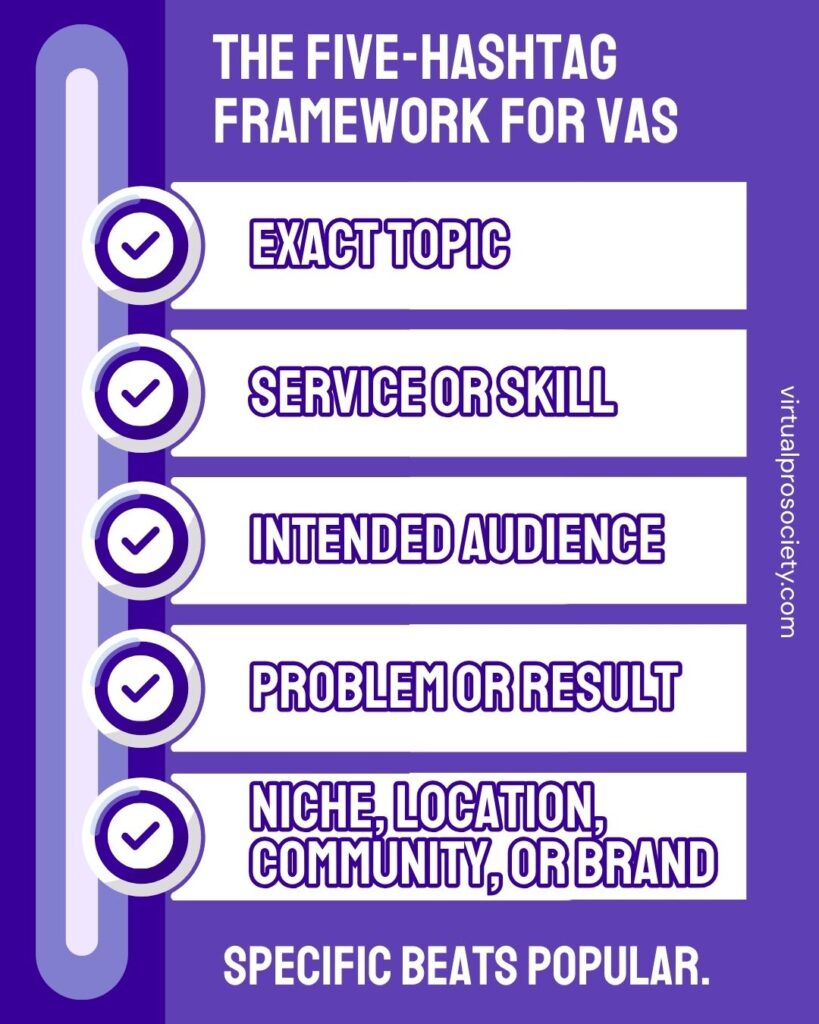
Use This Five-Hashtag Framework
You do not need to fill all five spots just because Instagram gives them to you. Three highly relevant hashtags are better than five that only sort of fit.
When five make sense, use this framework as a starting point:
1. The exact topic
Choose a hashtag that describes what the post is actually about.
Examples: #ClientOnboarding, #ContentPlanning, #EmailMarketingTips
2. The service or skill
Use a tag connected to the service being discussed.
Examples: #SocialMediaManagement, #EmailMarketing, #WebsiteDesign
3. The intended audience
Choose a tag your intended reader would recognize as relevant to them.
Examples: #VirtualAssistantTips, #SmallBusinessMarketing, #RealEstateMarketing
4. The problem or desired result
Add a phrase tied to what the person wants to improve.
Examples: #ClientExperience, #BusinessSystems, #ContentWorkflow
5. A niche, location, community, or branded tag
Use this final spot when one of these details genuinely matters to the post.
Examples: #CharlestonBusiness, #WellnessMarketing, #VirtualProSociety
A branded hashtag is useful for organizing your own content or supporting a campaign. It is not automatically a discovery tool, especially when nobody is searching for it yet.
Choose Hashtags Based on the Goal
This is where many VAs get it backward.
If you are creating educational content for other Virtual Assistants, tags such as #VirtualAssistantTips and #VirtualAssistantBusiness may make sense. Those are the people you want reading the post.
If you are using Instagram to attract clients, loading every caption with VA-focused hashtags may mostly attract other VAs. That can create a lovely little peer group, but it may not put your service in front of the business owners you want to hire you.
Choose tags based on who the post is for, not just what your job title is.
Example for a VA teaching other VAs
Post topic: How to set boundaries with a new client
Suggested hashtags: #VirtualAssistantTips #ClientBoundaries #VirtualAssistantBusiness #ClientManagement #FreelanceBusiness
Example for a social media VA seeking clients
Post topic: Three signs a business needs a better content workflow
Suggested hashtags: #ContentWorkflow #SocialMediaManagement #SmallBusinessMarketing #ContentPlanning #BusinessSystems
Example for a VA serving a local niche
Post topic: Content ideas for Charleston real estate agents
Suggested hashtags: #CharlestonBusiness #RealEstateMarketing #RealEstateContent #SocialMediaManager #ContentStrategy
These are examples, not blocks to copy and paste onto every post. The best five depend on the actual content, audience, and goal.
Put Hashtags in the Caption or Comments?
Instagram permits hashtags in either the caption or a comment on your post. There is no need to treat the first comment like a secret algorithm loophole.
With a maximum of five tags, I recommend placing them at the bottom of the caption. It is simple, easy to schedule, and unlikely to create the wall of clutter people were trying to hide back when they used 30.
If you prefer the cleaner look of putting them in the first comment, that is still an option. Scheduling tools such as Metricool can publish a first comment along with the post. Choose the workflow you will use consistently and move on.
Your placement is not the part that deserves 45 minutes of debate.
How to Research Hashtags Without Losing an Afternoon
You do not need a giant spreadsheet with 700 hashtags sorted by moon phase. Give yourself five or ten minutes and use a simple process.
Start with the language in the post
Write down the clearest words or phrases that describe the topic, service, audience, problem, and result. These are your starting terms.
Search the terms on Instagram
Type each term into Instagram search and look at the suggested results. Open the hashtag and review the content connected to it. Make sure the results match what you intended and are not full of unrelated or questionable posts.
Check the audience behind the hashtag
Ask whether the tag is more likely to attract peers, potential clients, or a completely random crowd. None of those audiences is automatically wrong. It needs to match the purpose of the post.
Use tools for ideas, not decisions
Metricool’s hashtag generator or another suggestion tool can help you find related terms. Do not blindly accept every suggestion. A tool can generate options, but you still need to check whether each one fits the post.
Keep small topic-based lists
Save a short working list for your main content topics, then choose the most relevant tags for each post. Do not paste the same five underneath everything you publish.
Instagram Hashtag Mistakes to Stop Making
Using broad tags for the sake of traffic
Tags such as #business, #success, and #entrepreneur are so broad that they provide little useful context. Specific tags help Instagram and the person searching understand what they will find.
Adding irrelevant trending hashtags
If a trending tag has nothing to do with the post, leave it alone. Random attention is not the same as reaching the right people.
Relying on #viral or #explorepage
These tags do not convince Instagram to make a post viral or place it on the Explore page. If it were that easy, we would all be famous before lunch.
Copying the same block onto every post
Your posts cover different topics and serve different goals. Your hashtag choices should reflect that.
Stuffing keywords everywhere
Clear language helps. Repeating “Virtual Assistant” eleven times in one caption makes the post awkward and annoying. Write for a human first.
Spending more time on tags than the content
If you spend five minutes on the hook and 30 minutes hunting hashtags, your priorities have wandered off without supervision.
What to Measure Instead of Obsessing Over Hashtags
Instagram may not give you a neat report showing exactly what each hashtag accomplished. Look at the performance of the post as a whole.
Depending on the content and your goal, pay attention to:
- Reach from non-followers
- Shares and saves
- Profile visits
- New follows
- Website or link activity
- Comments and direct messages from the right people
Do not judge your strategy from one post. Review several posts over time and look for patterns in the topics, formats, hooks, and calls to action that produce meaningful activity.
A post with fewer likes can still do its job if the right potential client visits your profile or sends a message.
Keywords Matter More Than Hashtag Tricks
Instagram search has become much better at understanding regular language. Use the phrases your audience would search for naturally in your content and caption.
If the post teaches VAs how to onboard a new client, say “how to onboard a new client.” Do not replace the clear phrase with something cute such as “the secret sauce behind the scenes” and expect Instagram to connect all the dots.
Use hashtags as supporting labels after you have made the topic clear. That is a much stronger strategy than tossing five tags onto a vague post and hoping one performs a miracle.
The Simple Instagram Hashtag Strategy
Instagram hashtags are not dead, but the old hashtag hustle should be.
Use up to five specific tags that match the topic, service, audience, and goal of the post. Put them in the caption or first comment. Check that they lead to relevant content. Then publish the post and get on with your day.
The hashtag is a label. The content still has to earn the attention.
Want Help Deciding What to Post?
Inside Virtual Pro Society, you get weekly content prompts, Canva templates, and practical AI tips created for Virtual Assistants. It is support for getting the work done without turning every post into another rabbit hole.
Helping VAs ditch the BS and build systems that actually work.
xoxo, Christi
Affiliate disclosure: This post contains an affiliate link for Metricool. I may earn a commission if you sign up through my link, at no additional cost to you. I only recommend tools I use or believe are genuinely useful.

