

Ready for New Clients? Fix These Five Things

Getting a yes from a new client feels fantastic until you realize your contract is in an old Google Drive folder, your invoice template still has last year’s prices, and you have no idea how you are collecting their passwords.
That is not the moment to build your entire backend.
You do not need a complicated business with 14 automations before working with new clients. You do need a few essentials that protect both sides, make the next steps clear, and allow you to begin the work without looking like you assembled the process during the discovery call.
If you are preparing to sign your first client or your current setup still feels held together with duct tape, fix these five areas first.
What Needs to Be Ready Before a Client Says Yes?
Your logo does not need to be perfect. Your website does not need seven pages. You do not need the most expensive version of every business tool.
You do need to know what you offer, how you will prove you can help, how the agreement and payment will be handled, what happens after the client signs, and where your boundaries sit.
There are also basic legal and financial requirements that depend on where you live and how your business is structured. If you are in the United States, the Small Business Administration’s launch guide covers business registration, tax IDs, licenses, bank accounts, and insurance. Requirements vary by location, so use the appropriate government and professional resources where you operate.
Handle the necessary foundation, but do not spend six months reorganizing Canva folders because you are afraid to talk to potential clients.
Mistake 1: Your Offer Is Still Vague
“I can help with anything you need” sounds flexible. To a potential client, it can also sound like you have not decided what you do.
Before taking on new clients, you should be able to explain:
- Who the service is for
- What problem it solves
- What is included
- What is not included
- How the work will be delivered
- How pricing works
- When you can begin
You do not need a fancy services guide to answer those questions. You need a clear offer.
Suppose you provide social media management. “I manage Instagram” leaves plenty of room for assumptions. Does that include strategy, graphics, captions, filming, engagement, scheduling, analytics, and answering DMs? The client may assume yes while your price covers three of those.
Clear scope prevents mismatched expectations before they become unpaid work.
Write a one-paragraph description of each service and a simple included/not-included list. If you cannot explain the offer without rambling for ten minutes, it needs more work before you sell it.
Mistake 2: You Treat a Portfolio Like a Permission Slip
A professional portfolio can help, especially for visual services such as design, social media, or websites. It is not a golden ticket, and you do not need ten paying clients before you are allowed to find your first one.
What you need is relevant proof that helps a potential client understand what you can do.
That proof might include:
- Work completed in a previous job that you have permission to share
- A clearly labeled sample project
- A before-and-after example
- A small audit demonstrating how you think
- A process walkthrough
- A client testimonial
- Your own business systems, content, emails, or website
- Relevant training combined with a strong sample
Never present sample work as paid client work. Never share confidential material because it looks good in your portfolio. Be clear about what the example is and what part you completed.
Choose a few strong pieces that support the service you are currently selling. A potential email marketing client does not need to scroll through 17 logo concepts and your cousin’s baby-shower invitation.
Your proof should make the next decision easier. It does not need to document every creative thing you have done since 2012.
Mistake 3: You Start Work Before the Contract and Payment
Excitement is not a substitute for an agreement.
Before client work begins, both parties should understand the scope, payment terms, timeline, responsibilities, and what happens when the plan changes.
A client contract may need to address areas such as:
- Services and deliverables
- Project or retainer fees
- Invoice dates and payment deadlines
- Late or missed payments
- Start dates and timelines
- Revision or change-request limits
- Client responsibilities and delays
- Confidentiality and account access
- Ownership and intellectual property
- Termination and offboarding
- Communication expectations
That is not a complete legal checklist. The right terms depend on the service, location, and relationship.
Do not copy a random contract from another VA, ask AI to invent one, or assume the client’s contract automatically protects your interests. Use an attorney, an attorney-created template appropriate for your business, or qualified legal guidance.
AI can help you organize questions for a lawyer or explain unfamiliar language in plain terms. It should not be the only thing standing between you and a legal problem.
Your payment process also needs to work before the client receives the invoice. Test the link, confirm the due date, check the payment options, and make sure the amount matches the proposal and contract.
Your policy might require a deposit, the first retainer payment, or full project payment before work begins. Whatever the agreement says, follow it consistently. “They seem nice” is not a payment method.
Mistake 4: You Build the Onboarding Process After the Sale
Client onboarding begins when someone agrees to work with you. It should not begin three days later when you remember to send an email.
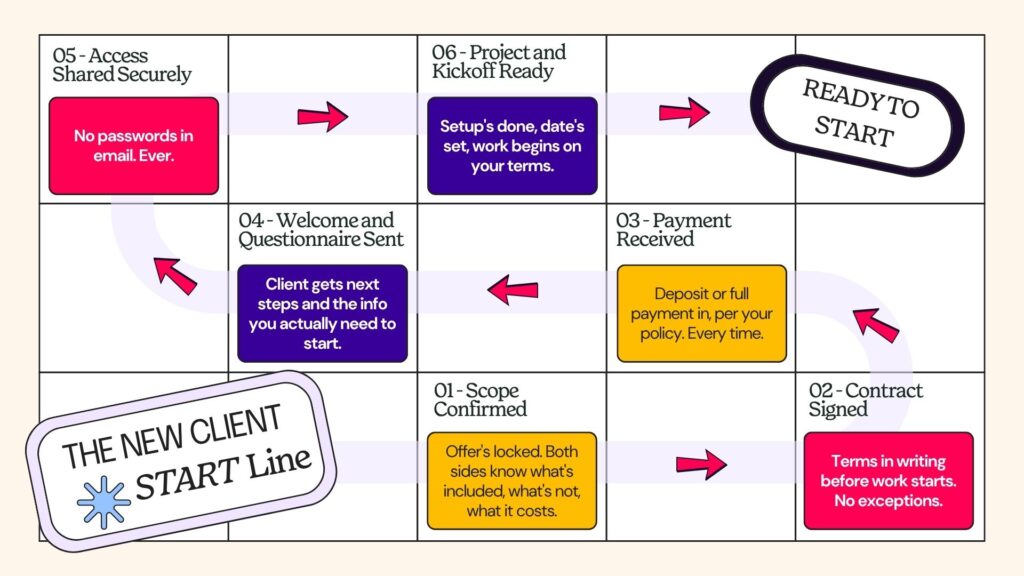
A simple workflow might look like this:
- Confirm the offer and scope.
- Send the proposal or agreement.
- Collect the signed contract.
- Collect the required payment.
- Send a welcome email and next steps.
- Collect the client questionnaire and necessary files.
- Request account access securely.
- Schedule the kickoff call if one is needed.
- Set up the project and begin on the agreed date.
You can manage this manually with a checklist when you are starting. The process matters more than the number of automations.
As the business grows, a CRM such as Dubsado can handle forms, proposals, contracts, invoices, and workflow steps. ClickUp can manage the delivery tasks after the client is onboarded. Google Workspace can hold documents and client folders. A password manager such as Dashlane can help clients share credentials without placing passwords in email or a spreadsheet.
You can see how these tools fit together in my guide to the virtual assistant tools I actually use.
Secure Access Is Part of Onboarding
Do not ask a client to send passwords through email, text, or a shared document.
Decide how account access will be shared and document the process. Whenever possible, have the client add you as a user with the appropriate permission level instead of sharing the primary login.
Keep track of:
- Which platforms you can access
- What permission level you have
- Whether two-factor authentication is enabled
- Who receives verification codes
- Which access should be removed when the work ends
Security is not an optional detail for later. Clients are trusting you with accounts, customer information, business files, and sometimes payment systems. Treat that access accordingly.
Mistake 5: Your Boundaries Exist Only in Your Head
You may know that you do not answer client messages at 9 p.m. The client cannot follow a boundary you never communicated.
Set expectations before the work begins for:
- Your working hours
- Expected response time
- Approved communication channels
- Meeting availability
- Turnaround times
- Rush requests
- Revisions and feedback
- Scope changes
- Delays caused by missing client materials
- Planned time off
Put the important terms in the contract and repeat the practical details during onboarding. The contract protects the agreement. The welcome materials help the client use the relationship well.
Capacity is part of this conversation too.
Do not give a start date because you feel pressured to say yes. Check your current workload, recurring deadlines, meetings, and the time the new service will actually require. A start date you can honor is more professional than an immediate start followed by two weeks of chaos.
Boundaries do not make you difficult. They make the working relationship predictable.
Your New Client Readiness Checklist
Before sending the proposal, confirm that you have:
Offer and Scope
- A clear service description
- Defined deliverables and exclusions
- Pricing and payment structure
- A realistic start date
Proof
- Two or three relevant examples
- Permission to share any client or employer work
- Clear labels on sample projects
- Testimonials or other evidence when available
Agreement and Payment
- An appropriate contract template
- A working proposal and signature process
- An invoice template with current pricing
- A tested payment method
- A rule for when work begins
Onboarding
- A welcome email
- A client questionnaire
- A list of required files and information
- A secure access-sharing process
- A project setup checklist
- A kickoff-call plan if needed
Communication and Boundaries
- Working hours
- Response-time expectations
- Approved communication channels
- Revision and scope-change process
- Client-delay policy
- Offboarding and access-removal steps
You do not need every step automated. You need every important step remembered.
What Can Be Improved Later?
Your first version will not be your final version.
After each new client, ask:
- What question did the client ask that should have been answered earlier?
- Which step caused unnecessary back-and-forth?
- What information did I forget to collect?
- What task should be added to the checklist?
- What expectation needs to be clearer next time?
Update the process while the experience is still fresh. That is how a solid client system gets built.
Do not automate a confusing process just because the tool has a workflow button. Fix the steps first. Then automate the parts that repeat and do not require your judgment.
Your Backend Does Not Need to Be Fancy
New clients do not need a parade of branded PDFs and 19 automated emails. They need clear expectations, secure access, reliable communication, and a confident next step.
Get the essentials in place before the yes. Use a checklist until the process becomes consistent. Improve it after every client without rebuilding the entire business each time.
Professional does not mean complicated. It means the client never has to wonder what happens next.
Get the Contract Piece Handled
If the contract is the part you keep avoiding, you can find the VA Contract Kit in the Virtual Pro Society shop. It gives you a focused place to start so you are not hunting through random internet templates after a client is already waiting.
Set up the basics now. Your future, slightly-less-panicked self will appreciate it.

