

A Social Media Strategy Without Tech Overwhelm

Social media gets overwhelming when every piece of advice adds another platform, feature, tool, trend, or daily task to your list.
Post more. Make Reels. Start a YouTube channel. Try Threads. Learn video editing. Build a funnel. Go live. Comment for 30 minutes before posting. Track 47 metrics. Apparently, you should also dance while pointing at words floating above your head.
Ummm, no.
If you did not grow up with a phone in your hand, the constant changes can make it feel as though you are always behind. Even people who work in online business get tired of relearning where Instagram moved a button this week.
You do not need to master every feature or show up everywhere. You need a social media strategy that supports a real business goal and a workflow simple enough to repeat.
These eight steps will help you build one without turning social media into another full-time job.
Why Social Media Feels Harder Than It Should
The technology is only part of the problem.
Most social media overwhelm comes from too many decisions:
- Which platform should I use?
- What should I post?
- Should this be a Reel, carousel, Story, or plain text?
- Which app should I use to create it?
- When should I publish it?
- Which numbers matter afterward?
When you make all those decisions from scratch every time, one post can eat an entire afternoon.
A useful system removes decisions. It gives you a primary platform, a few repeatable topics, a small number of formats, one creation workflow, and a way to tell whether the effort is helping.
Simple does not mean careless or outdated. It means focused.
Step 1: Choose One Primary Platform
You can have accounts in several places without actively creating original content for all of them.
Choose one primary platform based on three things:
- Where your intended audience spends time
- Which type of content you can reasonably create
- What the platform can help the business accomplish
Instagram may work well when your service is visual or your audience responds to Reels, carousels, and Stories. LinkedIn may be a better fit for professional services, corporate decision-makers, or written thought leadership. Facebook groups may be useful for conversations and relationship building. TikTok may make sense when searchable short video fits the audience and your strengths.
Do not choose a platform only because someone announced it is the place to be. If your potential clients are not there or you despise the content format, the strategy will be difficult to sustain.
Give one platform enough attention to learn what works before adding another.
Step 2: Give Social Media One Main Job
“Grow my business” is too broad to guide a content decision.
Choose one primary goal for the next 60 to 90 days. It might be:
- Build awareness with a specific audience
- Demonstrate expertise in one service
- Drive people to an email opt-in
- Generate inquiries for an offer
- Nurture existing followers and leads
- Build relationships with referral partners
Your goal determines what you create and what you measure.
If you want inquiries for email marketing services, your content should help business owners recognize email problems, understand your process, see evidence of your ability, and learn how to contact you. A month of motivational quotes may receive likes, but it does not do that job.
Sprout Social’s current guide to building a social media content strategy recommends connecting social media objectives to the larger goals of the business. That connection keeps content from becoming activity for activity’s sake.
Step 3: Make Your Profile Clear
Before trying to reach more people, make sure the right person can understand the profile she lands on.
Your profile should quickly answer:
- Who are you?
- Who do you help?
- What do you help them do?
- What should they do next?
Use a recognizable photo or logo. Write a bio that communicates the benefit of your work instead of listing every tool you know. Make the link and call to action match the current goal.
For example, this is vague:
Virtual Assistant | Canva | Dubsado | ClickUp | Coffee Lover
This is clearer:
I help service businesses plan and manage consistent social media content.
The second example tells a potential client why she should keep looking. Your love of coffee can reveal itself later.
Check the practical details too:
- Is the business name searchable?
- Is the profile image clear at a small size?
- Does the link work?
- Is the contact method obvious?
- Are outdated offers still mentioned?
- Do pinned posts support the current goal?
Your profile does not need to explain everything. It needs to make the next step obvious.
Step 4: Choose Four Useful Content Pillars
Content pillars are the repeatable topics that keep your message connected to the business.
For a VA, I recommend starting with:
- Problems: What your potential clients are dealing with
- Process: How you approach and complete the work
- Proof: Evidence that builds trust
- Perspective: What you believe, recommend, and do differently
These pillars give you enough variety without creating a content map that requires its own project manager.
Under each pillar, list three to five subtopics. A social media VA might include inconsistent posting, approval delays, planning, brand voice, reporting, client feedback, realistic expectations, and trends versus strategy.
Do not make “education” a pillar. Education describes how a post helps. It does not tell you what the post is about.
Your pillars should make the next idea easier to find and keep the content connected to what you offer.
Step 5: Pick Two Repeatable Formats
You do not need to use every format available on the platform.
Choose two you can create consistently and that fit the message. For example:
- Carousels and talking-head Reels
- Static graphics and Stories
- Text posts and simple videos
- Screen recordings and photo posts
Use the format that communicates the idea well. A three-step tutorial may work as a carousel or screen recording. A personal lesson may work better as a photo with a strong caption. A quick opinion might only need a text post.
The format is the container, not the strategy.
Create one or two reusable Canva templates for each visual format. Keep the same basic fonts, colors, spacing, and footer information. You can change the content without redesigning the entire brand every Tuesday. Not sure which dimensions to use? Sprout Social maintains an updated guide to social media image sizes for the major platforms. Bookmark it before you spend an hour designing something Instagram crops to death.
If video feels intimidating, start with a simple format:
- Record your screen while demonstrating a process.
- Add a voiceover to existing footage.
- Answer one question directly to the camera.
- Turn a written post into a short narrated slideshow.
Learn one method before buying another video course or downloading six editing apps.
Quick note: The ClickUp and Metricool links below are affiliate links. If you sign up through one, I may earn a commission at no additional cost to you.
Step 6: Build a Small Creation Workflow
A content workflow tells an idea where to go next.
Use one location to collect your ideas. I use ClickUp to capture ideas and move content from planning to published, but a Google Doc, notes app, or paper notebook can work just as well. The best capture tool is the one you will actually open again. you will open again.
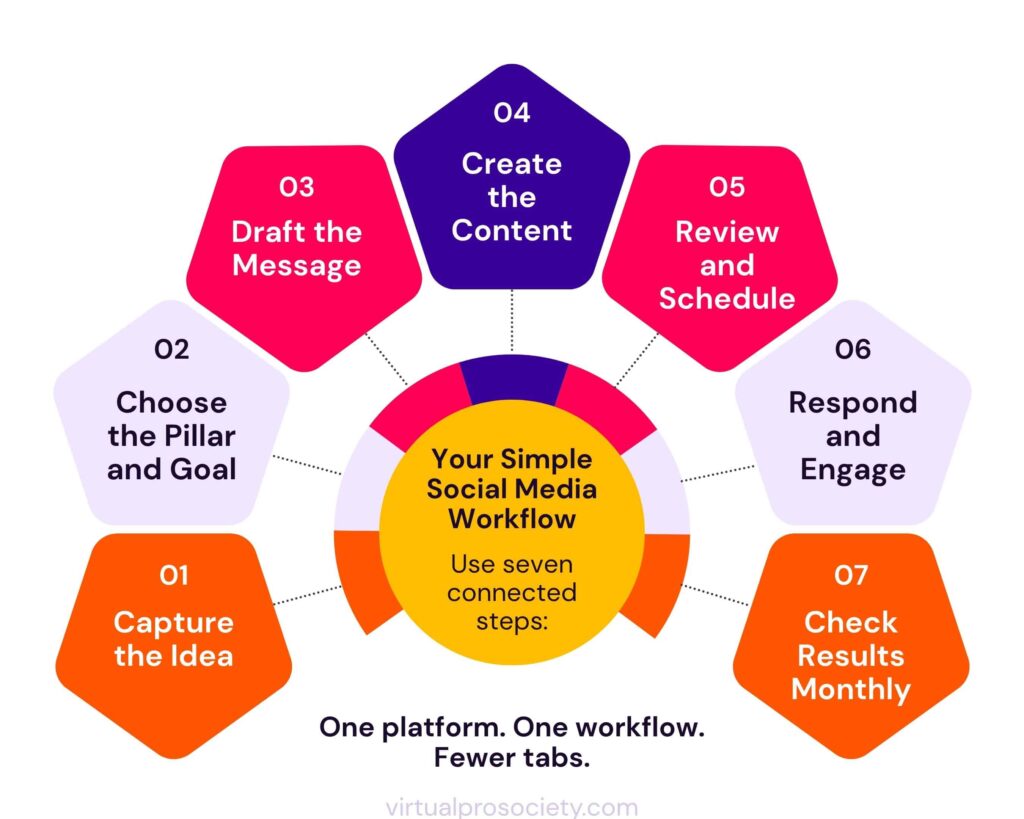
Then move content through a simple sequence:
- Capture the idea.
- Choose the pillar and goal.
- Draft the message.
- Create the visual or video.
- Review and schedule it.
- Respond and engage after publishing.
- Review the results later.
For an ADHD brain, separate the types of work when possible. Writing four captions uses a different kind of focus than designing four carousels. Batching similar tasks can reduce the mental gear-changing that makes content feel heavier than it is.
Keep the batch small. You do not need to plan 90 days of content in one sitting. Drafting three posts ahead is still planning ahead.
Use AI to help organize ideas, find repeated points, or create a first draft from your notes. Give it examples of your voice and review everything before publishing. AI can speed up part of the workflow. It should not decide what you believe or make claims you have not verified.
Step 7: Schedule Without Disappearing
Scheduling is not cheating. It is a way to publish consistently without arranging your day around the Post button. I use Metricool to schedule content and review performance without bouncing between a pile of tabs.
Meta Business Suite is another option if you primarily manage Facebook and Instagram. Choose one scheduler that supports the platforms and reporting you actually use. You can see how these tools fit into my broader Virtual Assistant tool stack.
Scheduling handles publication. It does not replace participation.
Set a realistic engagement routine, such as:
- Ten minutes after publishing to respond to early comments
- One short check later in the day
- Two or three dedicated community-engagement windows each week
Respond to genuine comments and messages. Ask useful questions. Join conversations where you have something relevant to add. Do not leave generic comments on 20 accounts because someone said the algorithm demands a ritual sacrifice.
Social media works better when people feel there is a person on the other side of the account.
Step 8: Track the Numbers That Match the Goal
Analytics do not need to involve a 14-tab spreadsheet.
Choose a few metrics connected to the primary goal.
If the goal is awareness
Track:
- Reach
- Non-follower reach
- Video views or watch time
- Profile visits
If the goal is trust and engagement
Track:
- Saves
- Shares
- Meaningful comments
- Direct-message conversations
If the goal is action
Track:
- Link clicks
- Email sign-ups
- Inquiries
- Sales or booked calls connected to social media
Review results monthly instead of checking a post every 11 minutes after publishing. Look for patterns across several pieces of content.
Ask:
- Which topics attracted the right people?
- Which formats were completed without draining me?
- Which posts led to profile visits, clicks, or conversations?
- What questions appeared in comments or DMs?
- What can I repeat, improve, or stop doing?
A post with fewer likes may be more valuable if it brings the right person to your website or starts a client conversation.
What You Can Stop Worrying About
You can build a useful social media presence without:
- Posting every day
- Using every new feature
- Following every trend
- Being active on five platforms
- Creating a new design for every post
- Sharing personal details you want to keep private
- Sounding like a polished marketing robot
- Tracking every metric the platform provides
- Buying another tool before learning the one you already have
There will always be another feature, platform, or person insisting that the strategy changed overnight. Most of it can wait.
Focus on clear content for a specific audience, a repeatable workflow, genuine interaction, and numbers tied to a business goal.
Your Minimum Social Media Tool Stack
You can run the workflow with four basic categories:
- Planning: ClickUp, a Google Doc, or another single idea bank
- Creating: Canva and the phone or computer you already own
- Scheduling: Metricool or Meta Business Suite
- Reviewing: Native platform insights or the scheduler’s analytics
Do not choose a tool because it has the longest feature list. Choose it because it handles the next repeatable step without adding unnecessary work.
One well-used tool beats six subscriptions you keep meaning to learn.
Build the Smallest System You Can Repeat
A social media strategy should make the work clearer, not give you another reason to feel behind.
Choose one primary platform and one goal. Make the profile clear. Build four useful content pillars. Use two repeatable formats. Follow one creation workflow. Schedule ahead, talk to people, and review a few meaningful numbers.
When that system feels manageable, improve one part at a time.
You do not need to conquer social media. You need a practical way to use it without letting it take over the business.
Make Content Easier Each Week
Inside Virtual Pro Society, Virtual Assistants get weekly content prompts, Canva templates, and practical ChatGPT and Claude tips. It is support for creating useful content without starting from a blank screen or chasing every new trick.
One platform. One workflow. Fewer tabs.
Affiliate disclosure: This post contains affiliate links. If you sign up through one of them, I may earn a commission at no additional cost to you. I only recommend tools I use in my own business.

