

AI for Virtual Assistants: How to Use AI Without Lowering Your Standards

AI for Virtual Assistants works best when it supports your judgment instead of replacing it. Tools like ChatGPT and Claude can help you write, research, organize and solve problems faster while you remain responsible for the final work. They can save you hours. They can also hand you polished nonsense with the confidence of a man explaining directions he absolutely does not know.
That second part matters.
Learning how to type a prompt is easy. Learning how to recognize weak output, protect client information and decide what is ready to use takes more skill. The VAs who understand that difference will be far more valuable than the ones copying and pasting whatever the robot hands them.
AI can assist with the work. The Virtual Assistant remains accountable for the result.
What Does AI for Virtual Assistants Mean?
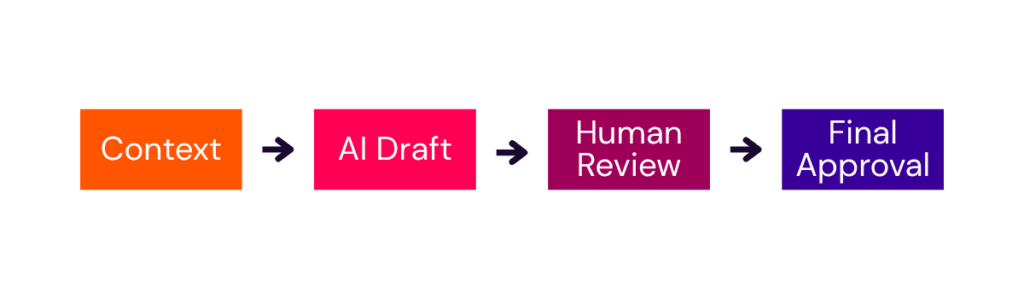
AI for Virtual Assistants means using artificial intelligence tools to support administrative work, content creation, research, communication, systems and client delivery. AI may help you draft, summarize, organize, compare or generate ideas. A human VA still provides the context, verifies the information and approves the final result.
This does not require replacing every process with automation or collecting tools like they are limited-edition Beanie Babies. It requires knowing which tool can help, giving it useful information and catching the mess before it lands in a client’s inbox.
Some VAs may choose to build AI systems and automations as a specialized service. That is a separate path, not the entry requirement for using AI professionally. You can become more valuable by learning to use AI well in the services clients already pay you to provide.
The rule I teach is simple:
AI gets a seat at the desk. It does not get final approval.
How Virtual Assistants Can Use AI
AI for Virtual Assistants is most useful when it supports work you already understand. It can speed up the first draft, organize a pile of information or give you a starting point when your brain has clocked out early. You still decide what is accurate, appropriate and ready for the client.
Client communication
AI can turn rough notes into a clear email, adjust the tone of a difficult message, draft a follow-up or explain a complicated process in simpler language. It can help with the wording, but it does not understand the entire client relationship unless you give it that context.
You still need to decide what should be said, what should be left out and whether the message sounds like a real person instead of an unusually cheerful customer-service manual.
Content support
Use AI to brainstorm ideas, develop outlines, repurpose long-form content and clean up a client’s original draft. The goal is to make the content clearer without scrubbing away everything that makes the client sound human.
Good content needs more than correct grammar. It needs a point of view, relevant examples and enough original thought to give people a reason to keep reading.
Meeting notes and follow-ups
AI can summarize transcripts, identify decisions, pull out action items and turn a rambling conversation into a useful follow-up. Always check names, dates, assignments and commitments against the original source before sharing the summary.
A polished recap with the wrong deadline is still wrong.
SOPs and documentation
Use AI to organize recorded instructions, draft a process from a transcript and turn scattered steps into a usable standard operating procedure. Someone who understands the process must confirm that the instructions are complete, accurate and in the correct order.
AI can make messy information look organized. That does not guarantee the process will actually work.
Research and comparison
AI can help develop research questions, compare options and summarize source material. It can also provide outdated information, broken citations and facts that sound perfectly reasonable but are completely made up.
Open the sources. Check the publication dates. Confirm that the source actually supports the claim. If the information affects a client’s money, reputation, health, legal obligations or major decisions, verification is not optional.
Your own VA business
Use AI to review an offer, prepare for a discovery call, draft a proposal, plan content or think through a sticky client situation. It can be a valuable thought partner when you ask it to question your assumptions instead of agreeing with everything you say.
AI can help you examine a decision. It should not make business decisions you have not bothered to examine yourself.
The Best AI Tools for Virtual Assistants
You do not need forty-seven subscriptions and a dashboard that looks like NASA. Start with the tool that matches the work in front of you.
ChatGPT
ChatGPT is a versatile choice for brainstorming, drafting, analyzing information, building reusable prompts and working through business decisions. It becomes more useful when you provide detailed context, examples and clear instructions instead of typing “make this better” and hoping for a small miracle.
Use ChatGPT when you need help generating options, organizing your thinking, reviewing information or creating a repeatable workflow. OpenAI’s prompt guidance recommends using clear, specific instructions and refining prompts based on the results.
Claude
Claude is strong at working with longer documents, reviewing detailed context, organizing information and producing natural-sounding writing. Many VAs find it especially helpful for client communication, content development, document work and projects that require more nuance. Anthropic also provides an official prompt engineering overview with techniques for improving Claude’s output.
Use Claude when the task includes substantial source material or when maintaining a natural voice matters.
Perplexity
Perplexity is useful for web research because it provides links to sources. Those links make verification easier, but they do not remove the need to open the source, check the date and confirm that it supports the answer.
Use Perplexity to find and organize possible sources. Do not treat the summary as the source itself.
Canva AI
Canva’s AI features can help with design ideas, image generation, presentation drafts and repurposing creative assets. They may speed up production, but the VA remains responsible for brand consistency, readability, licensing considerations and whether the final design looks like a professional made it.
Use Canva AI as a creative assistant, not the creative director.
What AI Cannot Do for a VA
AI can produce an answer quickly. It cannot carry the full weight of your professional judgment, client history or lived experience.
A valuable VA still needs to:
- Recognize when an answer does not make sense
- Understand what the client meant, not only what they typed
- Protect confidential and identifying information
- Match the client’s standards and preferences
- Ask follow-up questions when context is missing
- Verify facts, quotations, names, dates and sources
- Take responsibility for the final deliverable
- Know when a task needs a human from beginning to end
The goal is not to become the VA who produces the most AI output. The goal is to become the VA who knows how to turn AI assistance into work a client can trust.
Before You Use AI With Client Work
Responsible AI for Virtual Assistants starts with knowing what information should and should not be placed into an AI tool. Every client, task and platform has different privacy considerations. Do not assume that because you can paste information into an AI tool, you should.
Before using AI with client material:
- Review the client agreement and ask permission when expectations are unclear.
- Remove confidential, identifying or proprietary information that is unnecessary for the task.
- Review the current privacy and data controls for the platform and account you are using.
- Verify factual claims, calculations, quotations, links, names and dates against reliable sources.
- Check the final work for tone, accuracy, context and common sense before sharing it.
If you would not want the information placed in a public document with your client’s name attached, stop and confirm how it should be handled.
A Simple Process for Better AI Output
1. Give it context
Explain the client, audience, goal, source material, constraints and desired outcome. Include a strong example when voice or format matters.
Instructions point AI in the general direction. Examples show it what good looks like.
2. Review what it gives you
Look for missing information, repeated ideas, generic phrasing, factual errors and wording that sounds nothing like the client. Ask what the response assumed and what additional information could change the answer.
Do not confuse polished writing with correct writing.
3. Make the final call
Edit the output, verify the details and decide whether it is ready to use. Your name and reputation are attached to the deliverable. The robot does not have to sit on the client call if it goes sideways. You do.
Do Virtual Assistants Need an AI Certification?
No. Training in AI for Virtual Assistants can be valuable, but a formal certification is not required. Most Virtual Assistants can create plenty of value by learning to use AI responsibly within the services they already offer.
Clients care about the quality of your work, your judgment and whether you can produce reliable results. A certificate cannot make a weak deliverable accurate, thoughtful or useful.
You do not need to become an AI Integrator or learn advanced automation before you can benefit from AI. Start by using it well in the work clients already trust you to do.
AI for Virtual Assistants FAQ
What is the best AI tool for Virtual Assistants?
The best tool depends on the task. ChatGPT is a strong all-purpose option for brainstorming, drafting and analysis. Claude is especially useful for natural writing and longer documents. Perplexity can make web research and source checking easier. Most VAs should become confident with one or two core tools before paying for a collection of platforms they rarely use.
Is ChatGPT or Claude better for Virtual Assistants?
Neither tool is better for every task. ChatGPT is versatile and works well for structured brainstorming, analysis and repeatable workflows. Claude often produces more natural writing and handles detailed documents well. Testing the same real task in both tools is more useful than choosing one based on somebody’s dramatic Instagram Reel.
Can Virtual Assistants use AI for client work?
Yes, when the client permits it and the VA uses appropriate privacy, review and verification practices. Remove unnecessary sensitive information, understand the platform’s current data controls and personally review anything that will be delivered to the client or published under the client’s name.
Will AI replace Virtual Assistants?
AI will change many tasks VAs perform, particularly repetitive drafting, summarizing and administrative work. Clients will still need people who understand their businesses, make sound decisions, manage relationships and take responsibility for results. VAs who combine AI efficiency with human judgment will be better prepared as the work continues to change.
Do I need to learn AI automation or coding?
No. Some VAs will choose to offer advanced automation or AI implementation services, but every VA does not need to become a developer. Learning to use tools such as ChatGPT and Claude responsibly in your existing work is a valuable place to begin.
How should a VA start learning AI?
The smartest way to learn AI for Virtual Assistants is one useful workflow at a time. Choose one task you already perform regularly, such as drafting client follow-ups or turning meeting notes into action items. Practice that workflow in one AI tool, compare the result with your normal process and create a reusable prompt once you know what information produces useful output. One reliable workflow is worth more than fifty saved prompts you have never tested.
Start With One Useful Workflow
Training in AI for Virtual Assistants can be valuable, but a formal certification is not required. Choose one task you already understand, use AI to improve part of the process and pay attention to where human judgment still matters.
Once that workflow is reliable, move to the next one. A few tested processes will serve you far better than an overflowing folder of prompts you have never used.
If you want help practicing this inside your VA business, I share weekly ChatGPT and Claude lessons inside Virtual Pro Society. You can also explore VA Whisperer, my custom GPT created specifically for Virtual Assistants.
About Christi Balfour
Christi Balfour is a Virtual Assistant mentor, certified prompt engineer and founder of Virtual Pro Society and Systems Rabbit. She started her VA business in 2019 and uses ChatGPT, Claude and other AI tools in her own businesses, real client workflows and the custom AI systems she builds for small businesses.

